Part 2 of 3: The patchwork I'd been calling a homelab
Previously: Part 1: A fanless NAS, a windowsill, and one user.
A year ago, my “homelab” looked nothing like the post you just read. It looked like this.
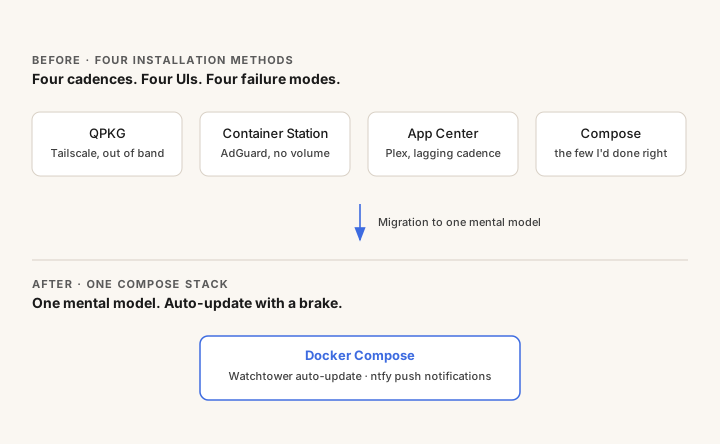
- Tailscale was installed as a native QPKG package, because the version in the NAS App Center was old enough to break tailnet behavior. I’d gone out of band, which meant manual updates from then on.
- AdGuard was running through Container Station’s clicky UI, with what turned out to be no persistent volume.
- Plex came from the App Center, on App-Center’s update cadence, which is whatever it is.
- A handful of other things were in Docker Compose, because that’s where I’d started doing it right.
Four installation methods. Four update cadences. Four UIs. Four failure modes. One NAS holding all of my personal data.
I was the patch pipeline
The Tailscale situation should have alarmed me sooner. The reason it ended up out of band is that the App Center version was lagging upstream by enough that my tailnet was actively misbehaving. So I bypassed the App Center, which felt clever at the time, and which then meant I was the update mechanism, forever.
Out-of-band installs mean I’m the patch pipeline. I’m bad at being a patch pipeline.
I learned this lesson the day I noticed I’d been running a Tailscale build with a known CVE for several weeks, because I hadn’t checked. The box has my photos. My media library. Sensitive personal data I’d rather not enumerate publicly. Treating its security update path as “things I’ll get to” was a posture I couldn’t defend if pressed.
One out-of-band install is manageable. Four is four separate pipelines I’m now responsible for, and I am not staffed for that.
AdGuard was the canary
The acute moment was AdGuard. I’d set it up months earlier through Container Station’s UI, because that’s what the documentation suggested and the UI made it easy. Click, click, running. Filter lists configured, DNS rewrites in place, query log accumulating, life good.
What the UI never asked me, and what I never thought to check, was where any of that state was being stored. The answer was: nowhere persistent. Container Station hadn’t configured a volume because I hadn’t told it to, and the UI didn’t surface that the writable container layer was the only thing holding my config. One docker rm and the entire AdGuard configuration would have been gone, with no warning and no recovery.
I’d been running it that way for months.
The fix was straightforward (copy the live config out of the running container, set up a Compose service with a real bind mount, restore the config). The lesson was that the UI hadn’t lied to me. It just didn’t know enough to warn me. Trust the UI was the failure mode, and the patchwork was symptomatic.
AdGuard was the canary and the mine was every other service that had been clicked into existence the same way.
The IaC instinct
Every other system I touch professionally lives in Git. Configs are diffed, reviewed, and rolled back. State is explicit. When something breaks, the question “what changed?” has a real answer. I wasn’t doing any of this for the box that holds my personal data, because the NAS UI made it convenient not to.
So I migrated everything to Docker Compose. The point was one mental model. Every service comes up the same way. Every service fails the same way. Every config change is a git diff. When something breaks at 11pm, I know how to triage it without remembering which UI I clicked through six months ago.
This was not a clean weekend. Each service had its own flavor of “where exactly is the state, and what happens when I move it?” Plex’s metadata library, Immich’s Postgres directory, Tailscale’s tailnet identity. Each one needed a careful copy from old-home to new-home, then a careful restart, then a careful verification.
Auto-pilot, with a brake
I do not, in fact, want to be the update pipeline at all. Even with everything on Compose, manually checking image versions is the kind of chore I will reliably let slide.
Watchtower handles this. Every morning at 4am it checks for new images and pulls anything updated. Containers get recreated with the same Compose config. If a service fails to come up, the restart policy keeps the previous version running.
The brake is that Watchtower is opt-in via container label. I add com.centurylinklabs.watchtower.enable=true only to services where I’m comfortable with auto-updates. Plex, Immich, AdGuard: yes. Anything fragile, or where I’d want to read release notes first: no. A breaking image push doesn’t take down the whole stack, just the services I’ve explicitly trusted.
When something does change, I get a push notification. Self-hosted ntfy for the actual server, with one trick: ntfy.sh acts as the upstream relay for iOS background push. The relay only sees a content-free wake-up; my phone fetches the real message body from my self-hosted ntfy. Messages stay private, push works at all, and I’m not running a separate Apple Push Notification cert at home.
The result: updates happen without me, and a notification arrives only if something changes. The box is asking less of me, not more.
Bonus: clean architecture paid me back
Here’s something I didn’t plan for. Once everything was in Compose with clean network boundaries, sharing Immich albums publicly (so family could view photos without joining my tailnet) became trivially safe. I spun up a stateless public proxy for Immich in its own container, attached to a dedicated Tailscale Funnel sidecar, with the public blast radius scoped to exactly that one container. Immich itself stays fully private. The shared proxy gets a real Let’s Encrypt cert via Funnel’s *.ts.net hostname.
That kind of pattern is awkward to do safely in a patchwork setup. In a clean Compose setup, it’s a stanza in a yaml file.
What’s coming
Part 3: The 11pm-in-an-airport test is the airport-friction post: making my home services feel like real websites, with the same hostname and the same password-manager autofill regardless of device or network.