Part 1 of 3: A fanless NAS, a windowsill, and one user
Five things led me to put a NAS on a windowsill, in this order.
- Manual backups and I have an unhappy history. My Mac has plenty of space, but my phone doesn’t have a 1TB drive, and I was reliably not plugging in the external HDD on any schedule that could be called a schedule. Cloud backup would have solved it, except paying a subscription to compensate for my own laziness felt like admitting defeat.
- I’m a Spotify premium user and I don’t love it. (Don’t @ me.) I want the iTunes-era folder-and-artist compact view, not whatever Spotify’s interface is doing now. Plex serving my own library scratches that itch in a way Spotify never has.
- Ads on my phone had become personal. Blocking them sent me to Pi-hole, which made me realize I could host a lot more than that if I had something to host it on.
- I love my password manager, right up until it refuses to autofill because the saved URL is a raw IP address I never typed the same way twice.
- The amateur engineer in me was clamoring for an excuse. You know the feeling. Custom builds.
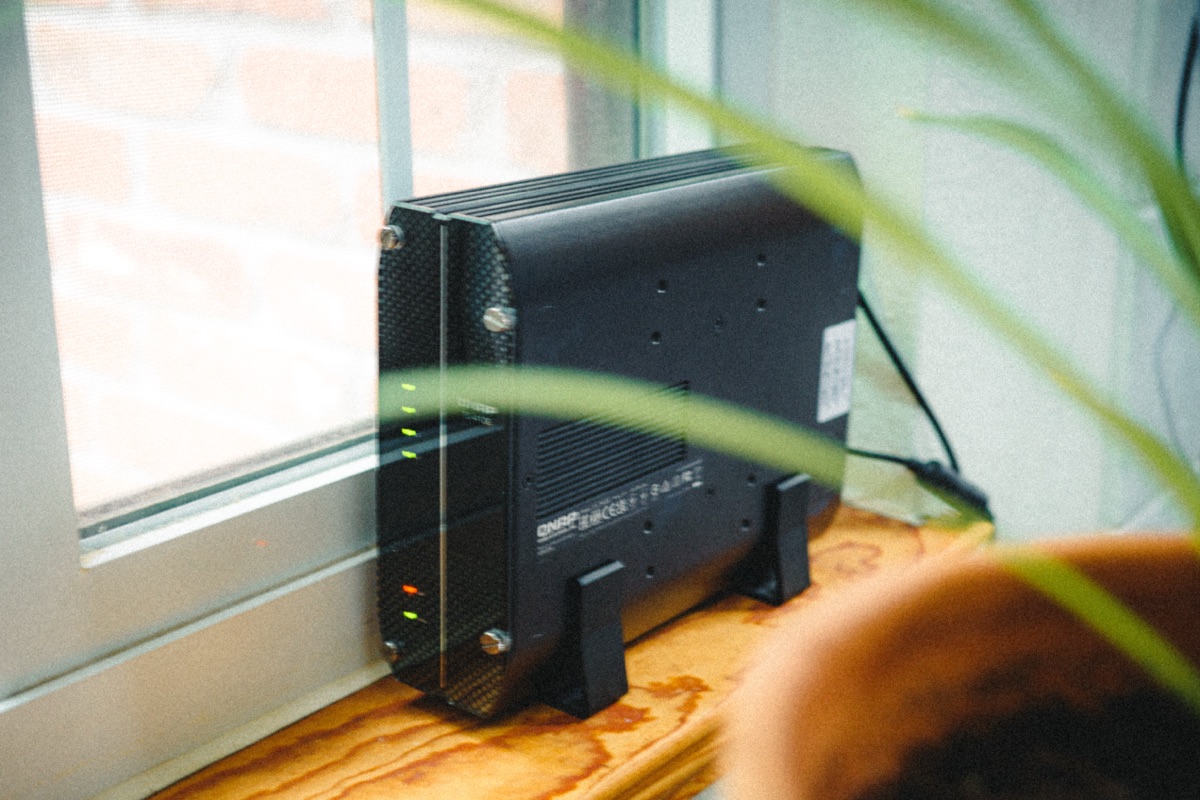
So I bought a small fanless NAS (a QNAP TS-410E, if you want the specifics), populated it with SSDs, perched it on a windowsill behind a curtain, and have since learned more about Docker, DNS, TLS, and route tables than I expected.
The box
A Celeron N5095 with no fans. SSD-only. The whole thing is silent enough that I forget it’s there until something pings me. It sits behind a curtain, in the corner of a room I don’t otherwise spend time in. You wouldn’t notice it, and that quietness is the whole point of the form factor.
A fair number of homelab posts open with a rack diagram and forty-something services in Portainer. That’s not what’s happening here. My homelab has one user. Me. That constraint shapes everything. I don’t need high availability. I don’t need clustering. I don’t need to learn Proxmox right now (the geek itch is loud, I’m aware). The goal was to use this thing, not maintain it.
The goal was to use this thing, not maintain it.
What’s running
The full inventory:
- Tailscale for off-network access, advertising the home subnet so I can reach everything else by its LAN IP.
- AdGuard filters ads and trackers for every device in the household.
- Caddy is the reverse proxy and TLS terminator for everything else.
- Plex serves the aforementioned music collection (and TV).
- Immich holds the photos.
- TRMNL drives the e-ink dashboard on my desk.
- ntfy pushes notifications from the NAS to my phone.
- Watchtower auto-updates everything else.
That’s it.
If you came here for a screenshot of forty-seven services, wrong blog. The list above covers what I do at home: listen to music, look at photos, browse without ads, see one or two pieces of useful information, and get told when the box wants my attention.
The mental model
After a year of running a messier version of this, and learning what hurts, I converged on three rules. They are deliberately unimpressive.
- Every service is
docker compose. Same up command, same down command, same logs command, same diff in Git. One mental model applied uniformly beats nine clever per-service workflows. - Every incident lives in
troubleshooting.md. When something breaks at 11pm, I want to find the answer fast, not re-derive it. - Every non-obvious decision lives in
decisions.md. Why are we using Caddy’s local CA instead of mkcert? Why is AdGuard on its own LAN IP? Why didn’t we just port-forward Immich? Future me has a habit of relitigating these questions, so I write the answer down once and link to it.
The whole shape
Here’s how traffic flows. Same hostnames at home and on tailnet, terminating at Caddy on the NAS, distributed to whichever container owns the request:
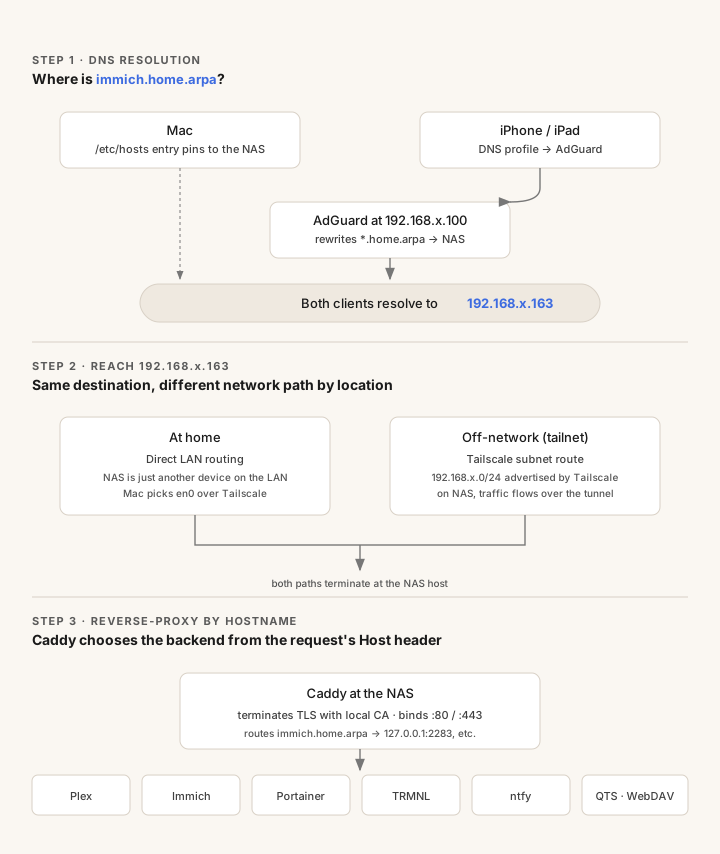
Four ideas hold this together:
- One stable IP for DNS (AdGuard) so devices, routers, and Tailscale ACLs all point at one thing.
- One stable IP for everything else (the NAS) so Caddy can do TLS and reverse-proxy in one place.
- Tailscale for off-network access without exposing anything publicly.
- AdGuard filtering applied to every device in the household, regardless of platform.
What’s coming
It did not start out this clean. The next two posts cover how it got here.
- Part 2: The patchwork I’d been calling a homelab: a NAS with services installed four different ways, no auto-updates, and a DNS resolver one
docker rmaway from oblivion. The migration to one mental model, with auto-pilot updates that tell me when something happened. - Part 3: The 11pm-in-an-airport test: what it took to make my home services feel like real websites, with the same hostname and the same password-manager autofill regardless of which device, which network, or which VPN I happened to be on.
If you’re here because you also want a quiet, dependable, one-user homelab and you’re allergic to maximalism, the next two posts are written for you.