Part 3 of 3: The 11pm-in-an-airport test
Previously: Part 1: A fanless NAS, a windowsill, and one user · Part 2: The patchwork I’d been calling a homelab
It is 11pm. I am in an airport. Plex has wedged itself and is refusing to stream. I need to log into the NAS from my phone to restart one container and get on with my life.
I am hunting for the LAN IP I never bothered to memorize. I am fishing the admin password out of my password manager by searching “QNAP” because the saved URL doesn’t match anything I’d type. I am trying to remember whether I’m on airport wifi (NAS reachable via Tailscale’s subnet route) or whether I’d already brought up Tailscale on the phone (NAS reachable directly).
This is the friction I built the rest of this setup to kill.
The moment you need to fix something is the moment you have the least patience for friction.
The ask, in product terms: same hostname, same autofill, no browser warnings, regardless of device or network. If I have to think about how to log in, I’ve already lost.
The IP was already solved
The whole problem collapses if you accept one observation: my NAS advertises 192.168.x.0/24 as a Tailscale subnet route. So 192.168.x.163 (the NAS) is reachable from anywhere on the tailnet, not just on the home network. Same IP, two contexts.
That means the IP is already solved. The only thing left is name resolution: making immich.home.arpa resolve to the NAS from every device, regardless of which network the device is on.
I’m using .home.arpa because it’s reserved by RFC 8375 for residential networks. It will never resolve publicly. No registrar, no domain renewal, no chance of collision with something I might buy later.
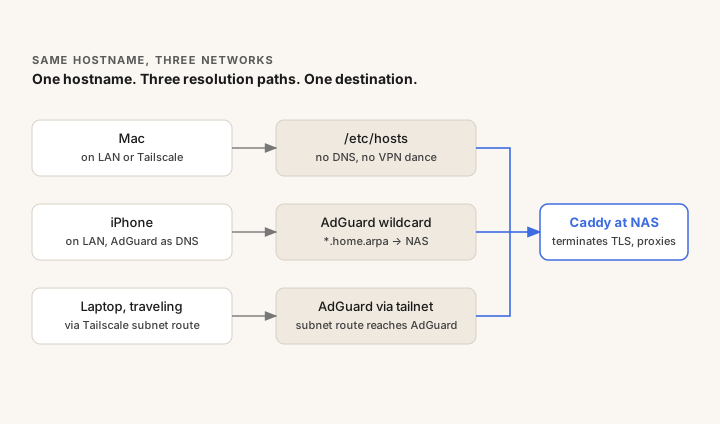
Two paths to resolution, one per device class:
- On the iPhone, AdGuard already runs as my DNS (from Part 1). One wildcard rewrite (
*.home.arpa → <nas-ip>) covers every service at once. It works at home (LAN to AdGuard) and traveling (Tailscale subnet route to AdGuard), with no client-side configuration. - On the Mac, a single line in
/etc/hosts. No DNS daemon, no VPN-vs-DNS interaction. The line works on hotel wifi, home LAN, PIA, Tailscale, in any combination.
Why AdGuard has its own LAN identity
A short architectural note that earns the rest of this. AdGuard isn’t a process on the NAS, even though it runs there. It’s a separate peer on the LAN, with its own MAC, on its own static IP (192.168.x.100). I run it on a virtual switch in macvlan mode so it gets its own L2 identity.
The point is decoupling. The Tailscale ACL and every device’s DNS pointer reference 192.168.x.100, not the NAS host’s IP. If the NAS were rebuilt or replaced, AdGuard could come back at the same .100 and nobody else would have to be reconfigured.
You don’t get this for free with network_mode: host. You get this by treating “the DNS server” as a thing that has its own LAN-routable presence, independent of the box it happens to run on.
TLS without the busywork
Browser warnings are papercuts. I wanted real HTTPS for immich.home.arpa, plex.home.arpa, and so on, even though none of these are public services.
Three options I considered:
- mkcert per service. Configure TLS in each app individually, mount certs in each container, track renewals manually. Adding a service means cert work plus app work.
- A public domain with Let’s Encrypt DNS-01. Real publicly-trusted certs, but it requires owning a domain and an ACME-capable DNS provider. Overkill for purely internal services.
- Caddy with
local_certs. One reverse proxy that runs its own internal CA, issues certs on demand, renews automatically, and terminates TLS for every service behind it. Trust the CA on each device once.
I went with Caddy. Adding a service is one stanza in the Caddyfile:
immich.home.arpa     { reverse_proxy 127.0.0.1:2283 }
plex.home.arpa       { reverse_proxy 127.0.0.1:32400 }
service.home.arpa    { reverse_proxy 127.0.0.1:8080 }
The airport, replayed
It’s 11pm. I’m in an airport. Plex has wedged itself.
I open Termius on my phone and SSH into nas.home.arpa. Tailscale is already up, so the hostname resolves and the tunnel routes me there. I run dcr plex (a shell alias for docker compose restart plex) and the service comes back. Less than a minute, start to finish.
The rest of the experience clicks into place the same way. The page loads with a real green padlock (because the CA is installed on my devices, and Caddy issued the cert from it). My password manager autofills the login form because the URL matches the entry I saved at home. The same hostname resolves through three different paths depending on which combination of LAN, hotel wifi, Tailscale, or PIA I’m on, and they all converge at Caddy on the NAS.
Same hostname. Three networks. One mental model.
If you’ve made it through all three posts, this is the whole thing. It’s small and dependable. It does what I do at home and gets out of the way for the rest. Future me at 2am can fix it without asking present me anything.